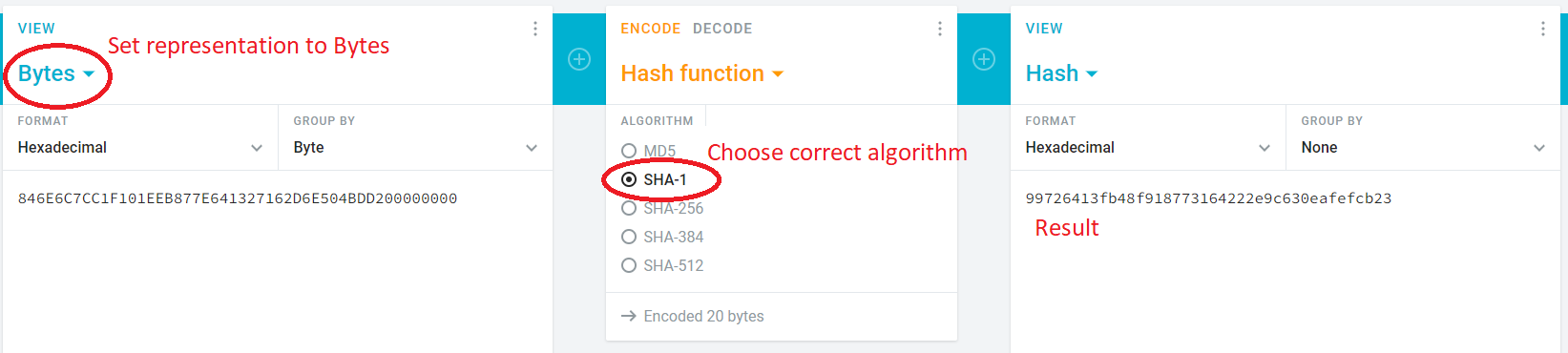
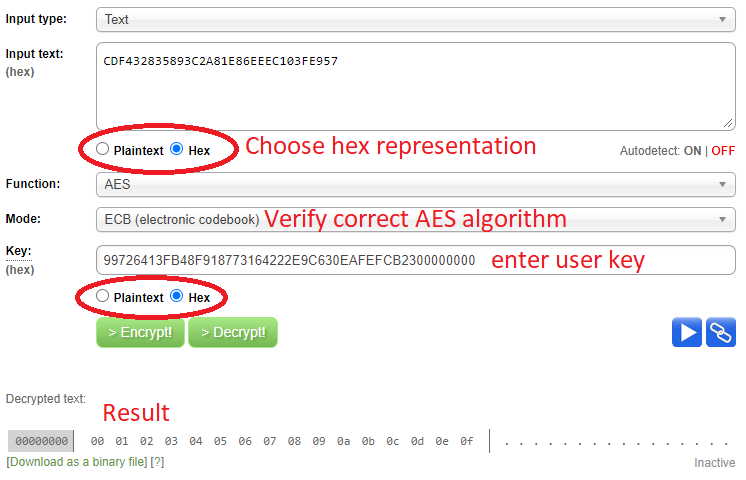
Authentication
To control the smart bike lock and read the correct values of the different characteristics, an authentication is needed. If this authentication is not received by the lock within 20 seconds after the connection was established, the lock automatically disconnects any connected device. In the meantime, it is not possible to control the lock.
There are two roles, which are distinguished by the used key. Both roles can control the lock. The additional features for the admin are the ability to establish a bonding, execute firmware updates, and change the configuration of the lock.
Authentication Process
The communication between the smartphone and the lock is encrypted with AES in ECB mode. A unique 128-bit key is preinstalled to a particular I LOCK IT smart lock. The key will be delivered with the lock and must be kept secret in the sharing backend or cloud server.
For the encrypted communication, a temporary key has to be computed, which needs to be transferred from your sharing backend to the smartphone (over a secured channel). This key permits the smartphone to authenticate and communicate with the I LOCK IT smart lock.
The seed, r, and r’ are transferred between the smartphone and the lock via the Authentication characteristic of the lock control service.
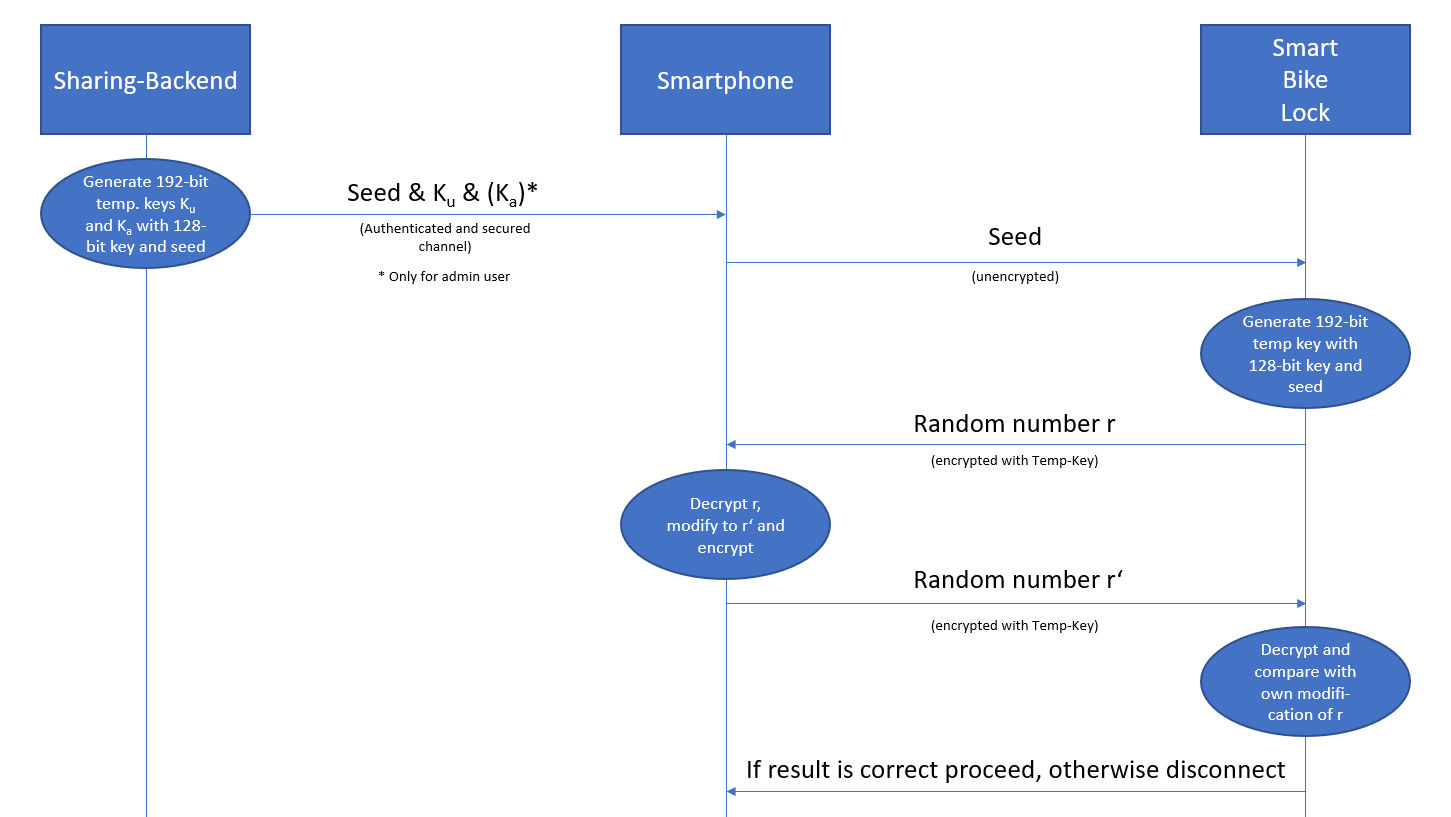
The authentication has to be done every time a new connection is established or the connection gets reestablished. If the sharing bike is returned to a delivery station and the rental process was terminated, the temporary key on the smartphone can be invalidated, and the user is not able to authenticate again at the bike.
Authentication Details
The symmetrical AES-ECB encryption is used to protect the smart lock from unauthorized access. Therefore, the lock and the sharing backend need the same key KINT. The key on the lock is preinstalled before delivery. The key can be downloaded from our tracking portal and must be kept secret.
There are two user roles implemented in the lock:
- Restricted user: Can connect, open, and close the lock.
- Admin: Can also install firmware updates and change configuration.
The distinction is done using two temporary keys:
Kufor usersKafor admins
Key Generation
- Generate a 128-bit random seed
s. - Concatenate
sandKINT, compute SHA-1 and pad to 192 bits → this isKa. - Compute SHA-1 of
Ka, pad to 192 bits → this isKu.
Ka = SHA1(s || KINT) || 0...
Ku = SHA1(Ka) || 0...
These keys are temporary and must be securely transmitted to the smartphone.
Java Example: Key Generation
byte[] internKey = {0x11, 0xAF, 0x5B, 0xC3, 0x0D, 0x7E, 0xB6, 0x45, 0xBF, 0x66, 0x3A, 0x54, 0x8D, 0x29, 0x0A, 0x7D};
byte[] seed = new byte[16];
Random random = new Random();
for (int i = 0; i < 16; i++) seed[i] = (byte) random.nextInt(255);

ByteArrayOutputStream outputStream = new ByteArrayOutputStream();
outputStream.write(seed);
outputStream.write(internKey);
byte[] tempKey = outputStream.toByteArray();

byte[] adminKey = SHA1(tempKey);
byte[] filler = {0,0,0,0};
outputStream = new ByteArrayOutputStream();
outputStream.write(adminKey);
outputStream.write(filler);
adminKey = outputStream.toByteArray();

byte[] userKey = SHA1(adminKey);
outputStream = new ByteArrayOutputStream();
outputStream.write(userKey);
outputStream.write(filler);
userKey = outputStream.toByteArray();
🔐 Authentication on the lock
After receiving the key from the backend, the smartphone authenticates with the lock as follows:
🧾 Prerequisites
- The smartphone has the temporary key
Ku(for user) orKa(for admin)
✅ Step-by-Step Procedure
🔹 Step 1: Connect to the Lock
- The smartphone connects via BLE to the lock.
- The lock expects a 128-bit data package sent via characteristic
0xBAABcontaining the seeds.
🔹 Step 2: Lock Generates Challenge
- The lock generates a 128-bit random number
r. - It encrypts
rusing AES-ECB and keyKu. - The encrypted result is sent to the smartphone.
🔹 Step 3: Smartphone Verifies Challenge
- The smartphone decrypts the received value with
Kuto retrieve the plaintextr. - It calculates
r' = r + 1without carry.
🔹 Step 4: Send Response
- The smartphone encrypts
r'with:Kufor user rightsKafor admin rights
- The encrypted value is sent back to the lock.
🔹 Step 5: Lock Verifies Response
- The lock decrypts the response and checks if
r' = r + 1is valid. - If valid:
- ✅ Authentication is successful
- Appropriate rights (user or admin) are granted
- If invalid:
- ❌ Connection is terminated
🛡️ Result Summary
| Condition | Result |
|---|---|
| Valid response with Ku | ✅ User rights granted |
| Valid response with Ka | ✅ Admin rights granted |
| Invalid response | ❌ Connection terminated |
Java/Android Example: Authentication
// 1. Send seed to lock
BluetoothGattCharacteristic characteristic = bluetoothGatt.getService(SERVICE).getCharacteristic(CHARACTERISTIC_AUTHENTICATION);
characteristic.setValue(seed);
taskQueueItem.queueWriteToCharacteristic(characteristic);

// 2. Receive challenge from lock (notification)
Byte[] challenge = Crypto.decrypt(userKey, event.data());

// 3. Modify challenge and send back
challenge[challenge.length - 1] += 1;
characteristic.setValue(Crypto.encrypt(userKey, challenge));
taskQueueItem.queueWriteToCharacteristic(characteristic);
It is important to mention that the representation as hexadecimal strings was chosen, but the calculation has to be done with the bytes not strings. Especially in programming languages like JavaScript, in which you don't have to specify the data type explicitly, it can easily happen that the wrong data type is used. This inevitably leads to incorrect results and authentication fails.
Example Values
Lock key: C308CF1B57E2DC408C6AA2DC19A8ED56
Seed:     2CD3BFB141396A2581C199DABF896498

Concatenate seed and lock key: 2CD3BFB141396A2581C199DABF896498C308CF1B57E2DC408C6AA2DC19A8ED56

Ka:       846E6C7CC1F101EEB877E641327162D6E504BDD200000000
Ku:       99726413FB48F918773164222E9C630EAFEFCB2300000000

Challenge received:   CDF432835893C2A81E86EEEC103FE957
Decrypted r:          000102030405060708090A0B0C0D0E0F
Modified r':          000102030405060708090A0B0C0D0E10
Encrypted response:   7DB79AD23ECB247CE613C6BEE8DB795D
All values must be 16 bytes long. If not, the connection will be terminated immediately.
Useful Tools